Testing JavaScript with Jest
5/19/2025
by: Trey Clark
What is testing?
“Testing in code is the process of verifying software functionality to ensure it meets requirements and expectations. It includes activities like unit testing, integration testing, and system testing to identify and rectify defects before deployment, ensuring software reliability and quality. Effective testing contributes significantly to maintaining code integrity and user satisfaction.” -ChatGPT, OpenAI
That about sums it up. We write tests to test the modularity, efficiency, and success of a code base. Testing can span across single functions, components, HTTP Requests, or even user behaviors.

Why is testing important?
Testing plays a crucial role in ensuring the quality and reliability of software by identifying bugs and issues early in the development process. By catching problems before they reach production, developers can address them quickly, preventing costly errors and ensuring a more stable product for end users.
Additionally, testing encourages developers to maintain up-to-date documentation and stay aligned with current versions of dependencies. This practice ensures that both the code and its supporting information evolve together, reducing confusion and technical debt over time.
Moreover, a strong testing framework streamlines the development process by providing faster feedback during coding. This immediate insight helps developers identify and resolve problems quickly, significantly reducing the time spent debugging and accelerating overall project progress.
Jesting in JavaScript
There are many libraries available for testing in JS. Some of those libraries are niche and test only certain aspects while others are extremely robust and can handle testing multiple locations throughout a code base. A solution that is somewhere on the more robust side is called Jest.
Jest is a testing framework that was developed by Facebook and released in 2014. Since then, it has seen tremendous support and numerous updates to increase the use cases for it. It boasts zero configuration to start running tests, which is attractive in the day of fast-paced development. It also comes with a built-in testing environment that is able to automatically detect testing suites.
Jest is able to handle tests with DOM elements, dependencies, any number of single functions, async functions, and error handling. It comes equipped with a feature that allows the developer to mock data and control values within functions that require complicated logic and environments.
Setting up Jest
Getting Jest installed and running in your project is easy! Before you start, make sure you have NodeJS installed.
1) Navigate to your new or existing project.
2) Run the command npm install --save-dev jest
3) Make a directory called tests. Within that, make a test suite called *.test.js, where * can be anything.
4) Once you have written your first test, run the test suite with node run jest.
Official documentation can be found here.
Test Examples
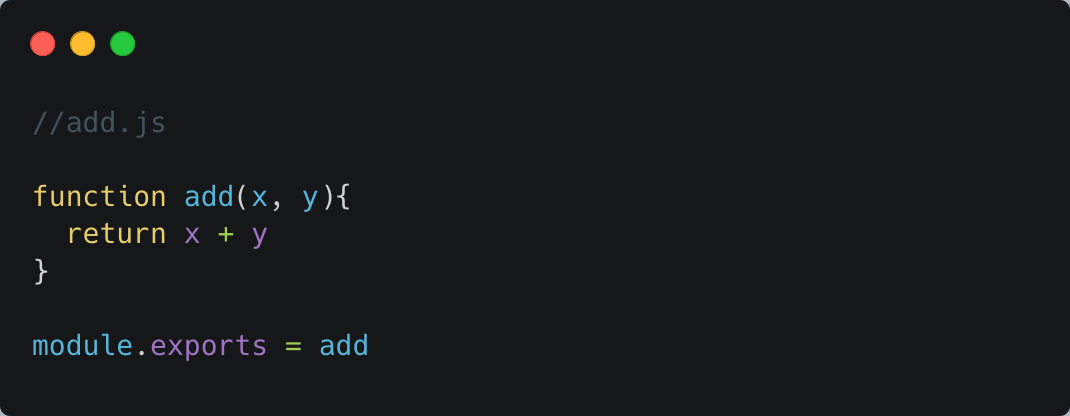
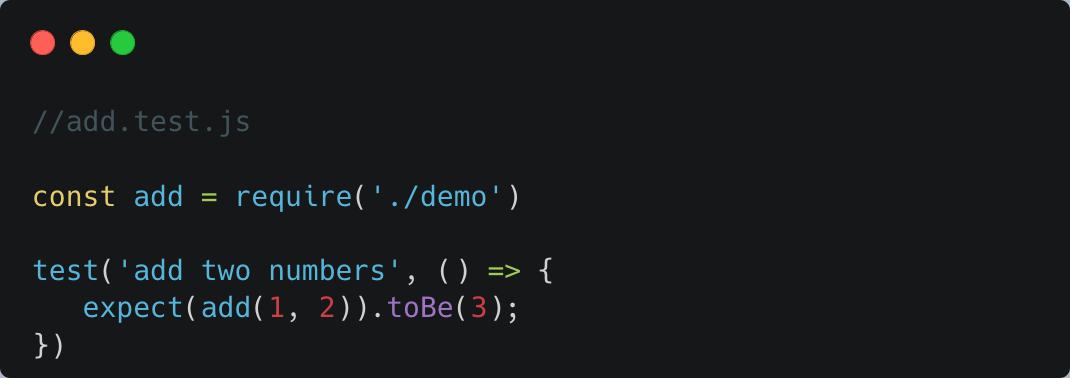
Tests have four main parts: the name, callback function that is the test logic, setup which is the state an object or environment needs, and the expected output or assertion. Look at the example below to see what a Jest test can look like.
Want to know more?
Check out this talk I gave with the Dallas Software Developers that goes over Jest more in-depth with more complicated testing examples!